QR menu · digital menu · cafés & restaurants
QR Code Menus for Cafés and Restaurants: How They Work and What to Include
A QR code menu is a web page guests open by scanning a code on the table. What to include, why a web menu beats a PDF, printing tips and what it costs.
This article is also available in Bahasa Indonesia
Contents · 7
A QR code menu is your menu published as a web page, opened when a guest scans a code on the table, at the counter or in the window. The phone camera reads the code and the menu appears in the browser, with nothing to install. The same address works as a link on WhatsApp, Instagram and your Google Business Profile, so people can read the menu before they arrive.
This guide covers how it works, what to put on it, how a web menu compares with a PDF, how to print codes that scan reliably, and what it costs to build one with us.
How does a QR code menu work?
- The menu is built as a web page with a permanent address, such as
yourcafe.com/menu. - That address is encoded as a QR code and printed on table stickers, tent cards or a sign by the till.
- Guests scan it and the page opens in their browser.
- When prices change, you update the page, not the code. Codes already printed keep working because the address stays the same.
Step four is the one people miss. A code that points to a PDF, a photo of the paper menu or a temporary link from a free shortener has to be reprinted as soon as the file changes or the service shuts down.
What should a digital menu include?
| Section | Priority | Why |
|---|---|---|
| Categories | Essential | Guests jump straight to drinks or desserts |
| Item names, prices, short descriptions | Essential | Show full prices rather than "ask staff" |
| Opening hours, address, map | Essential | The menu is also read by people deciding whether to come |
| WhatsApp button | Recommended | For takeaway, large orders or checking availability |
| Sold-out and seasonal labels | Recommended | Fewer repeated questions for staff |
| Spice level and ingredient notes | Recommended | Helps guests avoid ingredients such as nuts |
| Photos | Optional | Real, well-lit photos; a few good ones beat many dark ones |
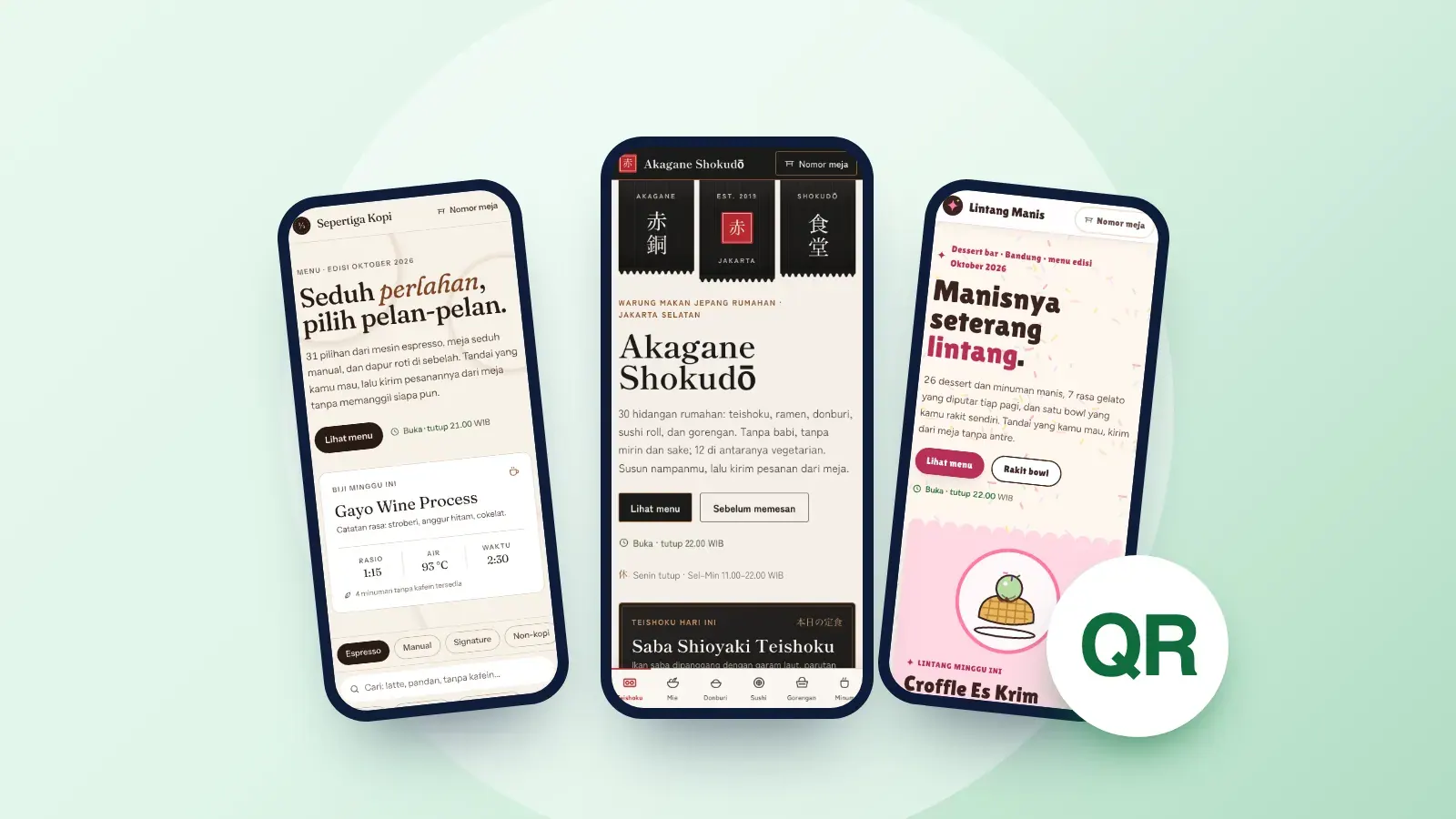
You can try 4 working examples in our digital menu gallery (in Indonesian), such as Akagane Shokudō, a Japanese home-style restaurant with allergen icons, or Lintang Manis, a dessert bar where guests build their own bowl. The businesses are fictional; the features are the same ones we build for clients.
Is a web menu better than a PDF?
| Aspect | Web menu | PDF or photo |
|---|---|---|
| Reading on a phone | Text reflows to the screen | Pinch, zoom and scroll sideways |
| File size | Light, loads on a weak signal | High-resolution photos can be heavy |
| Changing a price | Edit the text; the code stays | Recreate the file, often the code too |
| Search engines | The text can be read and indexed | Text inside a photo cannot be read |
| Accessibility | Text can be enlarged and read aloud | A photo cannot be read by a screen reader |
Whichever format you choose, keep text contrast high. WCAG recommends a contrast ratio of at least 4.5:1 for normal text, which also helps guests reading under dim café lighting.
Is a menu QR code the same as a payment QR code?
No. A menu code is an ordinary QR code containing a web address; anyone can generate one. A payment code moves money. In Indonesia, payment codes follow QRIS (Quick Response Code Indonesian Standard), set by Bank Indonesia, so one code can be paid from many banking and e-wallet apps. QRIS codes are issued through a licensed payment provider, not by a web designer.
The two work well side by side: guests read the menu from the table code and pay at the counter. Keep them visually distinct and in different places so nobody scans the wrong one.
How do you print QR codes that scan reliably?
- Use strong contrast: a dark code on a light background.
- Test from the guest's seat with a few different phones, at a normal distance and angle, before printing a batch.
- Print a short call to action and the address under the code, for example "Scan for the menu · yourcafe.com/menu", for anyone whose camera does not pick it up.
- Avoid glossy lamination under bright lights, which can reflect enough glare to block the scan.
- Keep a few paper menus for guests without a phone or who simply prefer paper. In the National Restaurant Association's 2024 US survey, 59% of full-service customers said they would pull up a menu with a QR code, but fewer than half were comfortable using it to order (48%) or pay (46%).
What does a digital menu cost?
At PintuWeb a digital menu is built as a landing page: from IDR 100,000, ready in 1–2 working days once the menu, prices and photos are complete. The first year of domain and hosting is included; renewal from the second year is roughly IDR 300,000–500,000 a year. All packages are on the pricing page.
We are based in Tulungagung, East Java, and work with cafés and restaurants anywhere remotely; see web design in Tulungagung for how that works. To make the menu reachable from Google Maps, link it from your Business Profile, as described in our Google Business Profile guide.
Frequently asked questions
Do guests need an app to open a QR code menu?
No. The menu is an ordinary web page, so the phone camera reads the code and the browser opens it.
Do I need to reprint the codes when prices change?
No, as long as the code points to the same web address. You only update the page, so the table stickers keep working.
Can the menu take takeaway orders?
Yes, a WhatsApp button can open a ready-to-send message. If you need a basket and online payment, an online store is the better fit.
Can the menu be in two languages?
Yes, for example Indonesian and English for visiting tourists. Mention it when you ask for a quote, because it doubles the text to write and check.
How long does it take to build?
At PintuWeb 1–2 working days for a one-page menu, counted from when the menu, prices and photos are complete.
Sources
AryaFounder & full-stack developer of PintuWeb. Building websites for small businesses since 2018, from the interface to the back end and database.
About the author